
Clipper Blade Not Cutting? 9 Causes & Fixes (Troubleshooting Guide)
Clipper blade not cutting hair? Diagnose the exact cause: dull edges, misalignment, tension, motor issues, or debris. Step-by-step fixes from a blade manufacturer who tests 10,000+ blades per day.
Your clipper blade is not cutting and you have a client in the chair. Before you throw the blade away and grab a new one, 90% of "dead" blades have a fixable cause that takes under 5 minutes to resolve. As a manufacturer that produces over 500,000 clipper blades per year and tests every batch on the factory floor, we see the same failure patterns repeatedly. This guide walks through every reason a clipper blade stops cutting, ordered from most common to least common, with the exact fix for each.
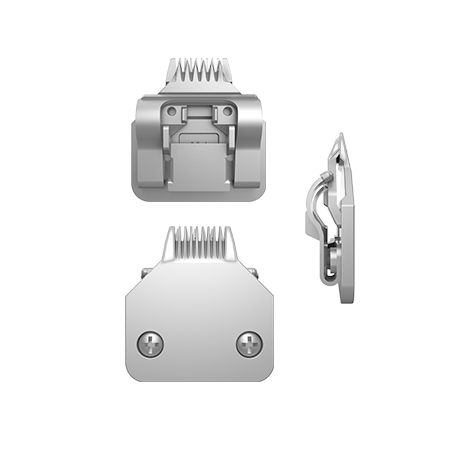
1. The Blade Is Dull (Most Common)
The single most common reason a clipper blade stops cutting is simple dulling. Clipper blades work by shearing hair between two precision-ground surfaces — a moving cutter and a stationary comb. When the cutting edges round over from use, hair bends and slides instead of being sheared cleanly.
How to Diagnose
- The blade pulls or tugs hair instead of slicing through it
- You need to make multiple passes to get an even cut
- The blade still cuts fine on thin, soft hair but struggles with thick or coarse hair
- No unusual sounds — the blade runs normally, just does not cut
Expected Blade Life by Material
| Blade Material | Hardness (HRC) | Cuts Before Dulling | Sharpenings Before Replacement |
|---|---|---|---|
| Stamped Carbon Steel | HRC 48–52 | 200–400 | 2–3 |
| Stamped Stainless (420/440A) | HRC 52–56 | 300–500 | 3–4 |
| MIM Stainless (440C) | HRC 58–62 | 800–1,200 | 4–5 |
| Ceramic (Zirconia ZrO2) | HRC 85+ equivalent | 2,000–3,000 | Cannot be resharpened |
The Fix
Professional sharpening on a surface grinder or lapping plate restores the cutting edge. DIY honing with a whetstone (1000-grit for reshaping, 3000-grit for finishing) works for taper blades. A5 detachable blades should always be sent to a professional sharpening service — the comb and cutter must be lapped flat to within 0.01mm tolerance, which requires a precision surface. For a detailed walkthrough, see our complete sharpening guide.
2. Blade Misalignment
A misaligned blade can look perfectly sharp under magnification but still fail to cut. The cutting action depends on the cutter teeth passing directly beneath the comb teeth with precise overlap. If alignment drifts by even 0.5mm, hair slips between the teeth instead of being sheared.
How to Diagnose
- The blade cuts on one side but not the other
- You see "tracks" or lines in the cut — some hairs are cut, others are missed in a striped pattern
- The blade was recently removed and reattached (or dropped)
- On A5 blades: the safety tooth is not visible 1.5–2.0mm to the left of the cutter edge
The Fix
For taper blades (Wahl Senior, Magic Clip, etc.): loosen the two screws, reposition the blade so the cutter tips sit 0.5–1.0mm behind the comb tips, then retighten. For A5 blades: remove and reseat the blade on the hinge, ensuring the snap mechanism clicks fully. Check the safety tooth position after reseating. For a detailed step-by-step, see our blade alignment guide.
3. Hair and Debris Buildup
Accumulated hair clippings, skin cells, product residue, and dried oil between the cutter and comb create friction and prevent the cutter from moving at full speed. The blade sounds like it is cutting but the cutter is actually moving too slowly to shear hair at the contact point.
How to Diagnose
- Visible hair packed between the blade teeth (look from the side)
- The blade sounds sluggish or lower-pitched than normal
- Performance gradually degraded over a session rather than suddenly stopping
- Blade was not cleaned after the previous use
The Fix
Use a blade cleaning brush to sweep debris from between the teeth. For packed buildup, soak the blade teeth (just the teeth, not the entire blade assembly) in blade wash solution for 60 seconds with the clipper running, then oil immediately after. This is the most common "instant fix" — many blades thought to be dull are simply dirty. See our cleaning guide for the full protocol.
4. Insufficient Lubrication (Dry Blade)
Clipper blades are two metal surfaces sliding against each other at 5,000–10,000 strokes per minute. Without oil, friction spikes immediately: the cutter slows down, the blade runs hot, and cutting efficiency drops by 30–50% within minutes. Running dry is also the fastest way to permanently damage blade rails.
How to Diagnose
- The blade runs noticeably hot to the touch (above 60°C / 140°F)
- Higher-pitched sound than normal (metal-on-metal without lubrication film)
- Performance was fine at the start of the day but declined steadily
- You cannot remember when you last oiled
The Fix
Apply 4–5 drops of clipper oil: one drop on each side rail at the rear corners, two drops across the front teeth. Run the clipper for 10–15 seconds to distribute. Performance should improve within 30 seconds. If the blade was run dry for an extended period, check the side rails for scoring marks — visible scratches mean the rails are permanently damaged and the blade will never run as smoothly as it did. Our oil guide covers all lubricant types and frequencies.
5. Blade Tension Problems
The tension between cutter and comb must be precisely balanced. Too loose: the cutter bounces off the comb surface on each stroke, creating intermittent contact that misses hair. Too tight: excessive friction overloads the motor, slowing cutter speed below the effective cutting threshold.
How to Diagnose
- Too loose: Blade rattles slightly when you shake the clipper, intermittent cutting (some strokes cut, others don't), visible gap between cutter and comb when viewed from the side
- Too tight: Motor sounds strained, blade gets very hot very fast, oiling doesn't help with heat
The Fix
On spring-tensioned blades (most professional A5 systems): replace the tension spring ($2–$5, available from any blade supplier). Springs lose tension over time from heat cycling and metal fatigue. On screw-tensioned blades: turn the tension screw one-quarter turn tighter (if too loose) or looser (if too tight), then test on hair. The correct tension allows the cutter to move freely with no rattle and no excess heat.
6. Motor or Drive Problems (Not the Blade)
Sometimes the blade is fine — the problem is the clipper itself. If the motor is weak, the battery is low (cordless clippers), or the drive mechanism is worn, the cutter will not move fast enough to cut hair effectively.
How to Diagnose
- The blade cuts fine on a different clipper (swap test)
- The clipper sounds weaker than when it was new
- Cordless clipper: battery indicator is low or the clipper has been running for 60+ minutes
- You can see the cutter moving visibly slowly compared to normal operation
The Fix
For cordless clippers: charge the battery fully and test again. Lithium-ion batteries deliver full power until about 80% depletion, then cutting performance drops sharply. For corded clippers with weak motors: the motor brushes may be worn (replaceable on pivot and rotary motor clippers). If the clipper is more than 3–4 years old with heavy daily use, the motor may need professional servicing or the clipper itself may need replacement.
7. Wrong Blade for the Hair Type
Using a fine-tooth finishing blade (#10, #15, #30, #40) on thick, matted, or coarse hair will cause the blade to jam, pull, and appear not to cut. These blades are designed for pre-cleaned, already-short hair or for precision work on thin coats.
How to Diagnose
- The blade jams, stalls, or pulls on thick sections but works fine on thin areas
- You are using a high-number blade (#15 or above) on a first pass
- Hair is matted, tangled, or unusually thick
The Fix
Use a coarser blade for the first pass (#3F, #4F, or #5F for pet grooming; standard taper blade for barber cuts), then switch to the finer blade for the finish pass. Skip-tooth blades are specifically designed for thick or matted coats — they have wider-spaced teeth that allow more hair to feed in without jamming. Never force a fine blade through thick hair — it damages the teeth and dulls the edge prematurely.
8. Damaged or Chipped Teeth
A single chipped tooth on the cutter or comb creates a dead spot where no cutting happens. The blade appears to work everywhere except one consistent stripe that misses hair on every pass.
How to Diagnose
- One specific stripe of uncut hair on every pass, in the same position
- Visible chip, nick, or bent tooth when inspecting the blade edge under good light
- The blade was dropped on a hard surface
The Fix
Minor chips can sometimes be ground out by a professional sharpening service, but the tooth width will be slightly narrower in that spot, which may cause a cosmetically acceptable but imperfect cut. Badly chipped blades should be replaced. Prevention: always put the blade guard or cover on when not in use, and never place blades teeth-down on hard surfaces.
9. Incorrect Blade Installation
This is more common than most professionals admit. A5 blades that are not fully snapped onto the hinge can sit at a slight angle that prevents the cutter from engaging the comb properly. Taper blades with one screw tighter than the other will sit crooked. Trimmer blades installed backwards (cutter on top of comb instead of under) will not cut at all.
How to Diagnose
- The blade was just installed or recently changed
- The blade wobbles or feels loose on the clipper
- A5 blade: you did not hear a definitive "click" when attaching
- Taper blade: the blade sits visibly crooked when viewed from the front
The Fix
Remove the blade completely, inspect the mounting mechanism for debris or damage, and reinstall carefully. For A5 blades: push until the latch clicks, then pull gently to confirm it is locked. For taper blades: tighten both screws evenly, alternating between them (like tightening lug nuts). For trimmer blades: verify the cutter (the moving piece with the slot for the drive) sits underneath the comb (the fixed piece with exposed teeth).
Quick Diagnosis Flowchart
| Symptom | Most Likely Cause | Quick Fix |
|---|---|---|
| Pulls hair, multiple passes needed | Dull blade | Sharpen or replace |
| Cuts one side, misses the other | Misalignment | Realign cutter to comb |
| Gradual performance decline | Debris buildup or dry blade | Clean + oil |
| Very hot blade | No oil or tension too tight | Oil immediately, check tension |
| Rattling sound + intermittent cutting | Tension too loose | Tighten screw or replace spring |
| Same stripe of uncut hair every pass | Chipped tooth | Sharpen or replace |
| Works on other clipper, not this one | Motor/drive issue | Service the clipper |
| Jams on thick hair, fine on thin | Wrong blade for hair type | Use coarser blade first |
| Blade wobbles or feels loose | Incorrect installation | Remove and reinstall properly |
Related Guides
- How to Sharpen Clipper Blades — Three methods with detailed instructions.
- How to Align & Adjust Clipper Blades — Step-by-step for A5, snap-on, and taper blades.
- Clipper Blade Oil Guide — Oil types, frequencies, and application technique.
- How to Clean Clipper Blades — Complete cleaning protocol.